

Blog

How to
Develop an App Like PocketKeeper
Contents hide 1 Introduction: 2 1. Understanding What PocketKeeper
Is 2.1 Key Features That Make PocketKeeper Stand
Introduction:
In today’s fast-paced digital era, people want intelligent, secure, and user-friendly financial management tools that help them track spending, save efficiently, and make better financial decisions. Apps like PocketKeeper have redefined personal finance by combining budget tracking, AI-based insights, expense categorization, and goal setting into one seamless platform.
If you’ve ever wondered how to develop an app like PocketKeeper, this in-depth guide walks you through every essential step — from understanding its core concept, selecting features, and choosing the right tech stack to security protocols, monetization models, and estimated costs. By the end, you’ll have a clear roadmap for building your own next-generation personal finance and budgeting app.
1. Understanding What PocketKeeper Is
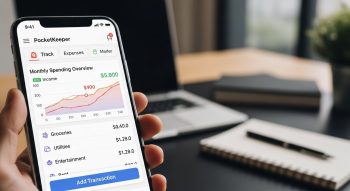
PocketKeeper is a popular personal finance management app that empowers users to track daily expenses, set savings goals, analyze spending habits, and manage budgets effortlessly. It leverages data analytics and AI to give users deep insights into where their money goes, helping them make smarter financial choices.
Key Features That Make PocketKeeper Stand Out
-
Automatic expense categorization via AI
-
Real-time budget tracking and alerts
-
Data visualization dashboards
-
Goal-based savings tracking
-
Bank synchronization and transaction imports
-
Security through end-to-end encryption
To develop an app like PocketKeeper, focus on simplicity, automation, and security — the three pillars of user trust in finance apps.
2. Market Overview and Business Potential
The global personal finance app market is projected to surpass $2 billion by 2028, with millions of users adopting digital money management tools. The rise of cashless payments, fintech innovation, and AI-driven insights has accelerated this trend.
Top Competitors
-
Mint
-
YNAB (You Need A Budget)
-
PocketGuard
-
Spendee
-
Wally
Market Opportunities
-
AI-driven personalized financial advice
-
Integration with cryptocurrency wallets
-
Gamified savings goals and rewards
-
Expense tracking for freelancers and small businesses
3. Core Features of an App Like PocketKeeper
When developing a personal finance app, it’s crucial to combine usability, accuracy, and automation. Below are the must-have features for an app like PocketKeeper.
a. User Registration and Profile Management
Secure signup options via email, Google, or Apple ID. Allow biometric login for convenience.
b. Expense Tracking
Users can manually or automatically log expenses and categorize them into groups (food, bills, entertainment, etc.).
c. Income Tracking
Enable users to record salaries, freelance earnings, or passive income.
d. Budget Creation
Users can set monthly or weekly spending limits and receive alerts when nearing limits.
e. AI-Powered Categorization
Automatically detect and categorize transactions based on historical data or merchant names.
f. Bank Account Integration
Connect to multiple banks using Open Banking APIs for real-time transaction imports.
g. Analytics & Data Visualization
Use interactive charts, graphs, and dashboards to display financial insights.
h. Goal-Based Savings
Help users create and track financial goals — like saving for a vacation, emergency fund, or car.
i. Notifications & Smart Alerts
Push notifications for upcoming bills, overspending, or new savings milestones.
j. Security Features
Integrate AES-256 encryption, two-factor authentication, and secure API gateways for data protection.
4. Step-by-Step Guide: How to Develop an App Like PocketKeeper
Step 1: Define Your App’s Vision and Audience
Decide if you’re targeting individual users, families, or small business owners. Outline your app’s USP (e.g., AI-powered budgeting, gamified saving, or crypto integration).
Step 2: Conduct Market and Competitor Research
Analyze what leading finance apps do well — and what users complain about. Use platforms like Google Play reviews, App Annie, or Sensor Tower to gather insights.
Step 3: Choose the Right Tech Stack
Here’s a recommended tech stack for a PocketKeeper-like app:
| Component | Technology |
|---|---|
| Frontend (Mobile App) | Swift (iOS), Kotlin (Android), Flutter or React Native |
| Backend | Node.js, Django, or Ruby on Rails |
| Database | PostgreSQL, Firebase, or MongoDB |
| APIs | Plaid, Finicity, Yodlee for bank integration |
| AI/ML Engine | TensorFlow, Scikit-learn |
| Security | OAuth 2.0, SSL/TLS, AES-256 encryption |
| Hosting | AWS, Google Cloud, or Azure |
| Payment Gateway | Stripe, PayPal for premium subscriptions |
Step 4: Design the UI/UX
The user experience is critical for finance apps. Focus on:
-
Minimalist dashboards
-
Clear visual indicators for spending and saving
-
Intuitive navigation
-
Color-coded categories
-
Visual spending charts and graphs
Step 5: Develop Core Features
Start with MVP (Minimum Viable Product) functionality:
-
Expense and income tracking
-
Budget setting
-
Data visualization
-
Login and user profile
-
Notifications
Then gradually add advanced features like:
-
AI expense categorization
-
Bank sync
-
Voice-based transaction logging
-
Goal-based saving tools
Step 6: Integrate AI and Automation
Artificial Intelligence is what makes apps like PocketKeeper smarter.
AI can:
-
Categorize expenses automatically
-
Suggest personalized savings plans
-
Detect unusual spending patterns
-
Forecast future expenses
Step 7: Prioritize Security and Compliance
Finance apps handle sensitive user data. Ensure your app complies with:
-
GDPR (Europe)
-
CCPA (California)
-
PCI DSS for payment data
-
ISO 27001 for data management
Security must include:
-
End-to-end encryption
-
2FA or biometric authentication
-
Regular vulnerability scans
Step 8: Testing and Quality Assurance
Test every component for functionality, performance, and data accuracy:
-
Unit Testing: Verify backend logic
-
Integration Testing: Validate API connectivity
-
Security Testing: Ensure safe data handling
-
UAT: Let real users test before final launch
Step 9: Deployment and Maintenance
Once tested, deploy on App Store and Google Play.
Perform regular updates to fix bugs, patch security, and introduce new features.
5. Additional Features to Stand Out
To gain a competitive edge, include some of these innovative features:
-
Smart Receipt Scanning: Use OCR (Optical Character Recognition) to log expenses automatically from photos.
-
Multi-Currency Support: Ideal for global travelers and freelancers.
-
Shared Wallets: For couples, roommates, or business partners.
-
Crypto Portfolio Tracking: Track Bitcoin, Ethereum, and altcoins.
-
Financial Education Hub: Offer tips, blogs, and financial insights.
-
Voice Assistant Integration: Add Siri, Alexa, or Google Assistant compatibility.
6. Monetization Models
Here’s how to make your finance app profitable:
1. Freemium Model
Offer basic expense tracking free and charge for advanced analytics, AI insights, or premium support.
2. Subscription Plans
Monthly or yearly plans for extra features like automatic bank sync, unlimited goals, or data exports.
3. Affiliate Marketing
Partner with banks, insurance, or credit card companies and earn commissions on referrals.
4. Ads (Cautious Use)
Show minimal, non-intrusive ads related to finance or budgeting tools.
5. White-Label Licensing
Offer your finance app infrastructure to other companies as a white-label solution.
7. Development Cost Breakdown
The cost of developing a personal finance app depends on scope, features, and design complexity.
| Development Stage | Estimated Cost (USD) |
|---|---|
| Research & Wireframing | $3,000 – $6,000 |
| UI/UX Design | $7,000 – $10,000 |
| Backend Development | $20,000 – $35,000 |
| API Integrations (Banking, AI) | $10,000 – $20,000 |
| Testing & QA | $5,000 – $8,000 |
| Deployment & Maintenance | $3,000 – $5,000 |
| Total Estimated Cost | $50,000 – $90,000+ |
A simplified MVP version can be built for $25,000–$35,000, including core features and design.
8. Marketing Strategy for a Finance App
a. App Store Optimization (ASO)
Use relevant keywords like “budget tracker,” “expense management app,” “money-saving app,” and “personal finance tool.”
b. Social Media Campaigns
Create financial awareness through infographics, budgeting tips, and success stories on platforms like Instagram, X, and LinkedIn.
c. Influencer Collaborations
Partner with personal finance coaches, YouTubers, or bloggers to increase brand visibility.
d. Content Marketing
Publish blogs like:
-
“10 Budgeting Mistakes to Avoid in 2025”
-
“How to Save Money Using AI Finance Apps”
-
“Smart Money Habits for Millennials”
e. Referral Programs
Offer discounts or premium access to users who refer new members.
f. Email & Push Notifications
Send weekly spending summaries and money-saving reminders to engage users.
9. Security and Compliance Checklist
| Security Measure | Description |
|---|---|
| Data Encryption | AES-256 and TLS for secure communication |
| Authentication | Biometric login, 2FA |
| API Security | OAuth 2.0, JWT tokens |
| Compliance | GDPR, CCPA, ISO 27001 |
| Cloud Protection | Regular backups and encrypted storage |
| Penetration Testing | Quarterly ethical hacking tests |
Ensuring privacy builds trust and retention, two key success drivers for finance apps.
10. Future Trends in Personal Finance Apps
The personal finance app market continues to evolve rapidly. Future-ready apps will integrate:
-
AI-Driven Financial Coaching: Real-time advice on spending and investing.
-
Blockchain Integration: Secure and transparent financial transactions.
-
Voice-Enabled Financial Commands: AI assistants for instant queries.
-
Predictive Analytics: Forecasting bills and income patterns.
-
Social Saving Goals: Gamifying savings with friends and family.
Staying aligned with these trends ensures your app remains relevant and competitive in 2025 and beyond.
Conclusion
Developing an app like PocketKeeper offers immense potential in the growing fintech space. By integrating AI automation, intuitive design, and advanced data security, you can create a finance app that empowers users to take control of their money with confidence.
Whether you’re targeting everyday spenders, small businesses, or digital-savvy millennials, a PocketKeeper-like app can help users track, save, and grow their finances — all in one place.
With the right strategy, tech stack, and marketing, your app can become the next big name in personal finance innovation. The key is to focus on simplicity, security, and smart insights — the very foundations that make PocketKeeper a success.

He is a SaaS-focused writer and the author of Xsone Consultants, sharing insights on digital transformation, cloud solutions, and the evolving SaaS landscape.