

Blog

How to
Build an AI Document Chatbot in 10 Minutes
AI document chatbots are intelligent assistants that can read,
understand, and answer questions from documents such as
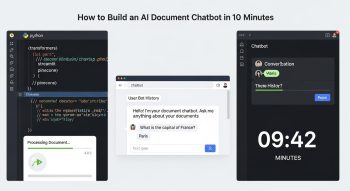
AI document chatbots are intelligent assistants that can read, understand, and answer questions from documents such as PDFs, Word files, or knowledge bases. They are highly useful for customer support, employee onboarding, research, and automated information retrieval. Building an AI document chatbot used to require programming skills, complex NLP pipelines, and large datasets, but with modern AI tools, you can create one in just 10 minutes without writing a single line of code. This guide will walk you step-by-step through building a fully functional AI document chatbot, from setup and document ingestion to deploying a responsive bot that can answer questions intelligently.
Understanding AI Document Chatbots
AI document chatbots combine natural language processing (NLP), machine learning, and knowledge retrieval to interpret user queries and provide accurate answers from uploaded documents. They work by converting documents into embeddings, storing them in a vector database, and using AI to retrieve relevant content in response to user questions. The result is a chatbot that can answer questions contextually, maintain conversation flow, and even summarize complex documents.
Benefits of AI Document Chatbots
AI document chatbots provide several benefits for businesses and individuals:
-
Instant answers: Users can get instant responses from large knowledge bases.
-
Automation: Reduces manual support and improves operational efficiency.
-
Context-aware responses: Provides relevant answers by understanding the context of the question.
-
Scalability: Can handle unlimited users and multiple documents simultaneously.
-
Integration: Can be embedded on websites, apps, or messaging platforms.
Choosing the Right No-Code AI Platform
To build a chatbot in 10 minutes, using a no-code AI platform is essential. Platforms provide drag-and-drop interfaces, AI integration, and document processing capabilities. Popular platforms include:
-
ChatGPT with Plugins—For advanced document comprehension.
-
Pinecone + OpenAI—Allows vector database storage and AI retrieval.
-
Tome.ai – AI knowledge extraction from PDFs and presentations.
-
LangChain + Weaviate—Visual tools to create document-based AI bots without coding.
-
Chatbase—Specifically designed for building document-based chatbots with AI.
Key Features to Look For
-
Document upload support (PDF, Word, Excel, etc.)
-
AI-powered question answering
-
Vector database support for fast retrieval
-
Easy deployment on website or messaging apps
-
Built-in analytics and chatbot optimization tools
Step 1: Preparing Your Documents
Before building your chatbot, gather all the documents you want it to understand. These may include:
-
Product manuals
-
Company policy documents
-
Training guides
-
Research papers
-
FAQs and support documentation
Formatting Your Documents
-
Ensure documents are clean, readable, and well-structured.
-
Remove unnecessary images or pages that may confuse AI comprehension.
-
Convert scanned PDFs to text using OCR tools if needed.
-
Use clear headings, subheadings, and bullet points to improve AI understanding.
Step 2: Uploading Documents to the Platform
Most no-code AI platforms allow direct document upload. This is the step where the AI ingests your data.
Uploading in Chatbase or Pinecone
-
Sign up for the platform.
-
Choose “Create New Bot” and select the document chatbot template.
-
Upload your documents (PDF, Word, or text files).
-
The platform automatically converts your files into embeddings or vector representations.
Tips for Large Documents
-
Split very large documents into smaller chunks.
-
Use descriptive file names to help with organization.
-
Confirm that the platform has successfully processed all content.
Step 3: Configuring AI Retrieval Settings
Once documents are uploaded, configure how your AI retrieves answers.
Adjusting Retrieval Parameters
-
Top-k results: Set how many document segments to consider for each query.
-
Similarity threshold: Adjust similarity scores to improve accuracy.
-
Context window: Choose how much context from the document to include in responses.
Adding AI Prompt Instructions
-
Define the bot’s behavior: e.g., “Answer questions concisely using the uploaded documents.”
-
Include fallback responses for unrecognized questions.
-
Specify tone and style, like formal, casual, or friendly.
Step 4: Testing Your AI Document Chatbot
Testing ensures your bot delivers accurate and relevant answers.
How to Test
-
Type questions related to your documents.
-
Verify that the AI references the correct section of the document.
-
Check for accuracy, relevance, and clarity of answers.
-
Refine prompt instructions or chunk size if answers are too vague or incorrect.
Common Testing Tips
-
Ask questions in multiple ways to ensure AI comprehension.
-
Test edge cases like incomplete sentences or typos.
-
Include sample FAQs to validate chatbot performance.
Step 5: Deploying the AI Document Chatbot
After testing, deploy your chatbot to the desired platform.
Deployment Options
-
Website Widget: Embed your chatbot directly into your website using a simple code snippet.
-
Slack or Teams: Integrate into internal communication platforms for company knowledge access.
-
Messenger or WhatsApp: Connect for customer-facing document support.
-
Mobile Apps: Integrate via APIs for mobile accessibility.
Ensuring Smooth Deployment
-
Customize the chatbot interface for branding.
-
Set up user authentication if sensitive documents are involved.
-
Monitor server load if many users are accessing simultaneously.
Step 6: Optimizing and Maintaining Your Chatbot
Even after deployment, continuous optimization improves chatbot efficiency and relevance.
Optimization Strategies
-
Regular Updates: Add new documents or update outdated content.
-
Monitor Analytics: Track frequently asked questions, unanswered queries, and response accuracy.
-
AI Retraining: Some platforms allow retraining on new data for improved performance.
-
User Feedback: Collect user input to refine responses and conversation flow.
Scaling Your Chatbot
-
Add multiple languages if your audience is international.
-
Integrate with CRM or ERP systems for contextual responses.
-
Connect with email or support ticketing systems to automate responses.
Advantages of AI Document Chatbots
Building a document chatbot in minutes offers multiple benefits:
-
Rapid Implementation: Go from zero to a fully functional chatbot in under 10 minutes.
-
Cost-Effective: No need for developers or complex coding pipelines.
-
High Accuracy: AI can provide precise answers from structured documents.
-
24/7 Availability: Chatbots provide round-the-clock support without human intervention.
-
Scalability: Handle multiple documents and unlimited queries simultaneously.
Use Cases for AI Document Chatbots
Customer Support
Provide instant answers to customer queries by referencing product manuals, FAQs, and troubleshooting guides.
Employee Onboarding
Help new employees understand company policies, training materials, and procedures through conversational guidance.
Research Assistance
Summarize research papers, white papers, and reports for quick reference in academic or business environments.
Knowledge Management
Centralize organizational knowledge and make it accessible through a conversational AI interface.
Marketing and Sales
Answer queries related to product features, pricing, and offers to increase lead conversion.
Conclusion
Building an AI document chatbot in just 10 minutes is now possible thanks to no-code AI platforms and intelligent document processing tools. By preparing your documents, uploading them to a platform, configuring retrieval settings, testing thoroughly, and deploying effectively, you can create a powerful chatbot that provides instant, context-aware answers. AI document chatbots save time, improve efficiency, and enhance user experience, making them an essential tool for modern businesses, educators, and researchers. Continuous optimization and monitoring ensure your chatbot remains accurate, relevant, and capable of handling a growing knowledge base. With the right platform and approach, anyone can build an AI-powered document chatbot quickly, efficiently, and without coding expertise.

He is a SaaS-focused writer and the author of Xsone Consultants, sharing insights on digital transformation, cloud solutions, and the evolving SaaS landscape.