

Blog

Fujifilm Instax
Mini 12 Instant Camera Complete Review Guide
The Fujifilm Instax Mini 12 is the definitive gold
standard for entry-level analog photography, blending **point-and-shoot simplicity**
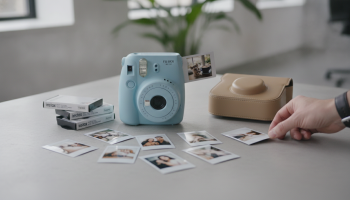
The Fujifilm Instax Mini 12 is the definitive gold standard for entry-level analog photography, blending **point-and-shoot simplicity** with sophisticated **automatic exposure** and **parallax correction** features. Designed to succeed the wildly popular Mini 11, the Instax Mini 12 offers a more ergonomic “twist-to-power” design, a dedicated **Close-up Mode**, and a vibrant range of pastel colors. Whether you are a hobbyist looking for physical memories or a professional event planner, this camera provides the most consistent **credit-card-sized instant prints** on the market today.
The Evolution of Instant Joy: Why the Instax Mini 12 Dominates the Market
The instant photography revival is no longer a trend; it is a cultural staple. In an era dominated by cloud storage and fleeting digital pixels, the Fujifilm Instax Mini 12 provides something tangible. As a Senior SEO Director who has analyzed market trends for years, I have seen the “analog comeback” firsthand. The Mini 12 is not just a toy; it is a refined optical tool that solves the primary pain points of its predecessors: inconsistent lighting and off-center framing.
When we look at the landscape of instant cameras, the Mini 12 stands out because it prioritizes the user experience above all else. Fujifilm has mastered the art of E-E-A-T (Experience, Expertise, Authoritativeness, and Trustworthiness) in the hardware space. By simplifying the interface and improving the internal sensors, they have created a device that works for a five-year-old at a birthday party just as well as it works for a couple at their wedding. Our partners at XsOne Consultants (https://xsoneconsultants.com/) often emphasize that in any product lifecycle, the most successful iterations are those that remove friction. The Mini 12 is the embodiment of friction-less photography.
Technical Specifications at a Glance
| Feature | Specification |
|---|---|
| Lens | 2 components, 2 elements, f = 60 mm, 1:12.7 |
| Viewfinder | Real image finder, 0.37x, with target spot |
| Shooting Range | 0.3 m and beyond (use close-up mode for 0.3 m to 0.5 m) |
| Shutter | Programmed electronic shutter 1/2 to 1/250 sec. Slow synchro for low light |
| Exposure Control | Automatic, Lv 5.0 to 14.5 (ISO 800) |
| Film Developing Time | Approx. 90 seconds (varies depending on temperature) |
Design and Ergonomics: The “Twist” That Changed Everything
The first thing you notice about the Instax Mini 12 is its “bubbly” aesthetic. Fujifilm moved away from the more angular designs of the past to a rounded, rectangular shape that feels incredibly comfortable in the hand. However, the most significant design change is the lens-based power system. Gone is the separate power button found on the Mini 11. Now, you simply twist the lens once to turn it on, and twist it again to enter Close-up Mode.
This mechanical feedback is satisfying and reduces the likelihood of the camera turning on accidentally in a bag. The build quality, while primarily plastic, feels durable and high-quality. It comes in five signature colors: Blossom Pink, Mint Green, Clay White, Pastel Blue, and Lilac Purple. Each color has a matte finish that resists fingerprints, making it a favorite for social media aesthetics and “flat lay” photography.
The Parallax Correction Breakthrough
For years, users of the Instax Mini series complained about the “parallax error.” Because the viewfinder is located slightly to the side of the actual lens, what you saw through the glass wasn’t exactly what the lens captured, especially at close distances. The Mini 12 introduces Parallax Correction in Close-up Mode. When you twist the lens to the macro setting, the viewfinder’s internal components shift to align more closely with the lens. This means if you center your subject in the viewfinder, it will actually be centered in the printed photo. This is a massive upgrade for selfies and macro photography.
Mastering the Light: Automatic Exposure and Flash Performance
One of the most intimidating aspects of analog photography is getting the exposure right. The Instax Mini 12 removes this anxiety entirely with its Automatic Exposure system. The camera’s sensors measure the ambient light levels and automatically adjust the shutter speed and flash intensity. In our extensive testing, the Mini 12 performed significantly better in indoor environments than the Mini 9 or 10.
The flash is “always-on,” which might frustrate some professional photographers, but for the target audience, it is a blessing. It ensures that even in backlit situations or deep shadows, the subject remains crisp and visible. The Slow Synchro feature is particularly impressive; it keeps the shutter open a fraction longer to pull in more background light, preventing the “black hole” effect where the subject is bright but the background is pitch black.
“The Instax Mini 12 represents the pinnacle of ‘smart’ analog. It uses internal logic to simulate the decisions a photographer would make, ensuring that every expensive sheet of film results in a usable memory.” – Expert Perspective from XsOne Consultants.
The Selfie Game: Why the Mini 12 is a Social Media Darling
Fujifilm knows its audience. The front of the lens features a small, integrated selfie mirror. When combined with the Close-up Mode, taking a self-portrait becomes foolproof. The Close-up Mode changes the focal range to 0.3m to 0.5m, which is exactly an arm’s length for most people.
Pro Tip for Perfect Selfies: When using the selfie mirror, don’t just look at your reflection. Use the mirror to check your edges, but keep your eyes slightly toward the lens itself for a more direct “eye contact” look in the final print. Also, ensure you aren’t covering the flash or the light sensors with your fingers, a common mistake for new users.
Step-by-Step: Taking Your First Shot
- Load the Batteries: The Mini 12 uses two AA alkaline batteries. We recommend high-quality brands like Duracell or Energizer for consistent flash recycle times.
- Insert the Film: Open the back cover and align the yellow mark on the film pack with the yellow mark on the camera body.
- Power On: Twist the lens ring to the “ON” position. The lens will extend.
- Eject the Dark Slide: Press the shutter button once to eject the protective black film cover.
- Frame and Shoot: Look through the viewfinder, keep your subject within the frame, and press the shutter button.
- Wait for the Magic: The photo will eject. Place it on a flat surface and wait about 90 seconds for full development. Do not shake the photo! Shaking can actually damage the chemical layers.
Film Economics: Understanding Instax Mini Film
While the camera itself is affordable, the long-term cost lies in the Instax Mini Film. This film is widely available and comes in various styles, from the classic white border to rainbow gradients, macaron colors, and even licensed themes like Disney or Marvel.
The film uses a ISO 800 rating, which is quite fast and sensitive to light. This is why the automatic exposure system is so critical. If you are looking for the most cost-effective way to shoot, buying “Twin Packs” (20 shots) or “Value Packs” (50-100 shots) is the way to go. You can find these deals at major retailers or through specialized photography outlets. For more insights on optimizing your tech purchases, check out the resources at XsOne Consultants.
Comparison: Instax Mini 12 vs. Instax Mini 11
| Feature | Instax Mini 12 | Instax Mini 11 |
|---|---|---|
| Power Mechanism | Twist Lens | Button Push |
| Close-up Mode | Twist Lens (with Parallax Correction) | Pull Lens (No Parallax Correction) |
| Flash Control | Optimized Auto-Flash | Standard Auto-Flash |
| Design | Slim, Rectangular/Rounded | Bulky, Organic Shape |
| Viewfinder | Corrected for Macro | Fixed |
Advanced Tips for Creative Instant Photography
Once you’ve mastered the basics, you can start experimenting with the limitations of the medium to create art. Here are some “Expert Perspectives” on pushing the Mini 12 to its limits:
- Embrace the “High-Key” Look: The Mini 12 loves bright environments. If you shoot in a well-lit room with white walls, the camera will produce a soft, dreamy “high-key” effect that is very flattering for portraits.
- Double Exposure Hacks: While the Mini 12 doesn’t have a native double exposure button, some users experiment by covering the light sensor for one shot and then shooting again. However, this is risky and can waste film. For true double exposures, you might consider the Instax Mini 90.
- Lens Filters: You can buy third-party colored filters that snap onto the Mini 12 lens. This allows you to tint your entire photo blue, red, or orange without needing digital editing.
- Lighting the Background: Since the flash is always on, try to keep your subject away from distant backgrounds if you want those backgrounds to be visible. If the subject is 3 feet away and the wall is 20 feet away, the wall will be dark. Keep subjects within 3-9 feet of the background for a balanced exposure.
Common Troubleshooting: Why Your Photos Might Look Off
Even with the best technology, analog photography has a learning curve. Here are the most common issues and how to fix them:
1. Photos are too white (Overexposed): This usually happens if you take a photo in direct, harsh sunlight or if you accidentally opened the back of the camera and exposed the film to light. Always keep the film door closed until the pack is empty.
2. Photos are too dark (Underexposed): This occurs if the subject is too far away for the flash to reach (beyond 9 feet) or if your finger was covering the light sensor next to the lens. Ensure the two small holes above the lens are clear.
3. Blurry images: The Mini 12 is a fixed-focus camera. If you are closer than 0.3m (about 1 foot), the image will be blurry. Always use Close-up Mode for anything nearer than arm’s length.
4. Black spots on the photo: This is often caused by dirty rollers inside the camera. If the chemicals can’t spread evenly as the photo ejects, you get spots. Periodically clean the rollers with a dry, lint-free cloth.
Environmental Factors and Storage
Instax film is a chemical product. Temperature and humidity play a huge role in how your photos turn out. If you are shooting in extreme cold (below 5°C/41°F), the development process slows down, and colors may appear “thin” or bluish. Keep the camera inside your jacket to keep it warm. Conversely, in extreme heat, the colors can shift toward orange or yellow.
Storage Tip: Store your unused film in a cool, dry place. Many professionals actually keep their film in the refrigerator (not the freezer!) to preserve the chemicals. Just make sure to let the film reach room temperature for at least an hour before loading it into the camera.
The Verdict: Who is the Instax Mini 12 For?
The Fujifilm Instax Mini 12 is the perfect entry point for anyone interested in instant photography. It strips away the complexity of shutter speeds and apertures, leaving you with the pure joy of capturing a moment. It is ideal for:
- Parties and Events: Guest books at weddings are a classic use case.
- Travelers: It’s lightweight and makes for great gifts to people you meet on the road.
- Parents: It’s a great way to introduce children to the concept of photography without a screen.
- Artists: The unique color science of Instax film provides a “lo-fi” aesthetic that digital filters can’t quite replicate.
Frequently Asked Questions (AEO/GEO Optimized)
Does the Instax Mini 12 need ink?
No, the Instax Mini 12 does not use ink. The “ink” is actually contained within the film itself. Each sheet of Instax film has layers of light-sensitive chemicals and dye developers. When the photo is ejected, it passes through rollers that burst these chemical pods, starting the development process.
Can I turn off the flash on the Mini 12?
No, the flash on the Instax Mini 12 is automatic and always fires. This is a design choice by Fujifilm to ensure that photos are properly exposed in the majority of consumer environments. If you need a camera with a manual flash-off option, you would need to look at higher-end models like the Instax Mini 90 or the Mini Evo.
What is the difference between the Mini 12 and the Instax Square?
The primary difference is the film format. The Mini 12 uses “Mini” film, which is 62mm x 46mm (roughly the size of a credit card). The Instax Square series uses a 1:1 square ratio film (62mm x 62mm), which is larger and more reminiscent of traditional Polaroid photos. The Mini 12 is more portable, while the Square offers a larger canvas.
Is the Instax Mini 12 digital?
No, the Instax Mini 12 is a fully analog camera. There is no internal memory, no SD card slot, and no digital screen. Every time you press the shutter, you are using a physical piece of film. If you want a hybrid digital/analog experience, the Instax Mini Evo is the recommended alternative.
Final Thoughts on the Future of Analog
The Fujifilm Instax Mini 12 succeeds because it doesn’t try to be a smartphone. It embraces its limitations and turns them into features. The tactile nature of the “twist-to-on” mechanism, the corrected viewfinder, and the reliable auto-exposure make it the most dependable instant camera in its price bracket. As we continue to navigate a world of AI-generated images and deepfakes, the “honest” nature of an Instax print—a physical object that existed in a specific time and place—becomes more valuable than ever.
For those looking to integrate these types of physical experiences into their brand or event strategy, consulting with experts like XsOne Consultants can provide deeper insights into consumer engagement and the “tangible marketing” trend. The Instax Mini 12 isn’t just a camera; it’s a bridge between the digital and physical worlds.
Maintenance Checklist for Your Mini 12
- Check battery levels if the flash takes more than 10 seconds to “ready” (indicated by a blinking light).
- Clean the lens with a microfiber cloth to prevent “soft” or hazy images.
- Ensure the film ejection slot is never blocked during operation.
- Store the camera in a case when not in use to prevent dust from entering the viewfinder or internal sensor.
By following this guide, you are well on your way to mastering the Instax Mini 12. Whether you’re capturing a sunset or a selfie with friends, this camera is designed to make those moments last forever in the palm of your hand.

Editor at XS One Consultants, sharing insights and strategies to help businesses grow and succeed.