

Blog

How Long
Does It Take to Build a Custom Website? A Comprehensive Timeline Guide
Introduction Contents hide 1 Introduction 2 The Realistic Timeline:
Breakdown by Complexity 2.1 1. Basic Informational Website
Introduction
In the digital age, your website is often the very first interaction a potential customer has with your brand. It is your 24/7 salesperson, your brand ambassador, and the central hub of your digital marketing ecosystem. Consequently, business leaders and marketing executives frequently ask one pressing question when embarking on a digital transformation project: "How long does it take to build a custom website?"
The answer, while frustratingly nuanced, is critical for project planning and budget allocation. Unlike generic template-based sites that can be spun up in a weekend, a high-performance custom website is an engineering project. It requires strategic planning, bespoke design, rigorous coding, and extensive testing.
Generally speaking, a professionally built custom website takes anywhere from 12 to 16 weeks (3 to 4 months) for a standard business site, while large-scale e-commerce platforms or web applications with complex functionality can span 6 to 9 months or more. This timeline is not arbitrary; it is the necessary duration to transform abstract business goals into a functional, secure, and scalable digital asset.
In this comprehensive guide, we will dissect the web development lifecycle, examining each phase to provide you with a realistic roadmap. We will explore the factors that accelerate or stall progress and offer expert insights into managing your expectations and your launch date effectively.
The Realistic Timeline: Breakdown by Complexity
To understand how long does it take to build a custom website, one must first define the scope. A brochure site differs vastly from an enterprise platform. Below is a realistic breakdown based on industry averages for custom development—excluding template reconfiguration.
1. Basic Informational Website (10–14 Weeks)
This category typically includes small business websites with 5–10 unique page templates (Home, About, Services, Contact, Blog). The functionality is standard, focusing on lead generation forms and CMS integration (like WordPress or headless solutions).
- Focus: Brand identity, copywriting, and mobile responsiveness.
- Primary Delays: Content production and client feedback loops.
2. Mid-Sized Business / Lead Gen Site (14–20 Weeks)
These sites are more robust, featuring 20+ pages, complex animations, third-party integrations (CRM, email marketing tools), and perhaps dynamic content filtering.
- Focus: User Experience (UX), conversion rate optimization (CRO), and search engine optimization (SEO) architecture.
- Primary Delays: Data migration and API integration testing.
3. E-Commerce & Web Applications (6–12 Months)
This tier involves custom checkout flows, inventory management synchronization, user account portals, and high-level security compliance.
- Focus: Security, scalability, database architecture, and backend logic.
- Primary Delays: Complex logic development, payment gateway certification, and extensive QA testing.
Phase-by-Phase Timeline Guide
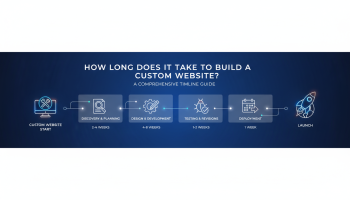
A custom website project is typically broken down into five distinct phases using the Waterfall or Agile methodology. Understanding the granular requirements of each phase helps stakeholders understand where the time goes.
Phase 1: Discovery and Strategy (Weeks 1–3)
This is the foundation of the entire project. Before a single pixel is drawn or a line of code is written, your agency needs to understand your business DNA. Skipping or rushing this phase is the leading cause of project failure.
Key Activities:
- Stakeholder Interviews: Understanding business goals, target audience personas, and unique value propositions.
- Competitor Analysis: Identifying gaps in the market and opportunities for differentiation.
- Sitemap & Information Architecture (IA): Mapping out the user journey and site structure.
- Tech Stack Selection: Deciding between technologies (e.g., React, Vue, PHP, Python) based on scalability needs.
Phase 2: UI/UX Design and Prototyping (Weeks 4–8)
In this phase, the visual identity of the website takes shape. This is often the most collaborative phase, requiring intense client involvement.
The Process:
- Wireframing: Creating low-fidelity blueprints (skeletons) of the key pages to establish layout and hierarchy without the distraction of colors or images.
- Mood Boards & Style Guides: Defining typography, color palettes, and button styles.
- High-Fidelity Mockups: Applying the visual design to the wireframes. This is exactly how the site will look.
- Interactive Prototypes: specialized tools like Figma or Adobe XD are used to simulate user flow and interactions.
Note: This phase often experiences the most “scope creep” as stakeholders visualize new ideas. Strict revision rounds are essential to keep the timeline on track.
Phase 3: Front-End and Back-End Development (Weeks 9–15)
This is usually the longest continuous phase where the heavy lifting occurs. The approved designs are handed off to the engineering team.
Front-End Development
Developers translate the visual designs into code (HTML, CSS, JavaScript). They ensure animations are smooth, the site is responsive across all devices (mobile, tablet, desktop), and accessibility standards (WCAG) are met.
Back-End Development
This involves setting up the server, database, and Content Management System (CMS). For custom web apps, this includes writing the logic that powers features like user logins, search algorithms, and data processing. API integrations (connecting your site to Salesforce, HubSpot, or Stripe) happen here.
Phase 4: Content Creation and Population (Concurrent or Weeks 12–16)
A common bottleneck is content. A beautiful design with Lorem Ipsum text cannot launch. While development is underway, the content team (copywriters, photographers, videographers) must produce the assets.
Critical Tasks:
- Writing SEO-optimized copy for all pages.
- Sourcing or shooting high-quality imagery.
- Migrating blog posts or case studies from the old site to the new one.
- Formatting content within the CMS to ensure it renders correctly.
Phase 5: Quality Assurance (QA) and Launch (Weeks 17–20)
Before the site goes live, it must be battle-tested. Launching a buggy site can damage brand reputation instantly.
The QA Checklist:
- Cross-Browser Testing: Ensuring the site works on Chrome, Safari, Firefox, and Edge.
- Device Testing: Checking layouts on various screen sizes (iOS and Android).
- Performance Optimization: Minifying code and compressing images to ensure Core Web Vitals compliance (speed).
- Security Scan: Checking for vulnerabilities, setting up SSL, and configuring firewalls.
- User Acceptance Testing (UAT): The client explores the site to catch any logic errors or missing content.
Key Variables That Influence the Timeline
Why do some projects finish in 3 months while others drag on for a year? Several variables can significantly expand the timeline.
1. Scope Creep
“While we are at it, can we also add…” is the most dangerous phrase in web development. Adding features mid-project requires revisiting the design and development phases, causing exponential delays. A rigid project scope defined in Phase 1 is your best defense.
2. Content Readiness
If the client is responsible for content, delays are almost inevitable. Writing copy for 20 pages is harder than most anticipate. We highly recommend hiring professional copywriters or having the content ready before development begins.
3. Feedback Turnaround Time
Agencies typically allocate 2–3 days for client feedback. If a stakeholder takes two weeks to approve a homepage design, that delay cascades through the entire schedule. Consolidated feedback from all decision-makers is crucial.
4. Data Migration Complexity
Moving from an old platform to a new custom build isn’t always a copy-paste job. If you have thousands of e-commerce products or a decade of blog posts with broken image links, cleaning and mapping that data takes considerable time.
Custom vs. Template: Is the Wait Worth It?
Clients often ask if they should just use a template to save time. While templates allow for a 4-week launch, they come with technical debt.
- Speed: Custom sites are optimized for code efficiency, whereas templates often carry bloatware that hurts Google PageSpeed scores.
- Security: Custom code is less vulnerable to mass automated attacks that target popular theme vulnerabilities.
- Scalability: A custom build is an asset you own and can extend indefinitely. A template restricts you to the developer’s preconceived limitations.
If you are building a long-term brand asset, the 3–5 month investment is negligible compared to the years of performance the site will deliver.
How to Expedite Your Website Build
If you need to launch faster than the standard timeline, consider these strategies:
- MVP Approach (Minimum Viable Product): Launch with the core pages (Home, Services, Contact) first, and roll out secondary pages or complex features in a Phase 2 update.
- Prepare Content Early: Start writing content and gathering images the moment you sign the contract.
- Designate a Single Point of Contact: having one decision-maker on the client side prevents “design by committee” paralysis.
Frequently Asked Questions
1. Can a custom website be built in under a month?
Technically, yes, if the scope is extremely small (a one-page microsite) and resources are unlimited. However, for a standard multi-page corporate site, rushing the process under 4 weeks almost always results in poor QA, security gaps, and a subpar user experience. Quality engineering requires time.
2. Why does the design phase take so long?
Design is not just art; it is problem-solving. The design phase involves user research, wireframing, UX logic, and multiple rounds of iteration to ensure the final product converts visitors into customers. Rushing design leads to development issues later.
3. How much of my time will be required during the build?
Expect to invest 2–5 hours per week. You will need to attend discovery workshops, review designs, provide access to internal assets, and perform User Acceptance Testing. Your active participation is vital for staying on schedule.
4. Does the timeline include SEO implementation?
Yes, a reputable agency integrates technical SEO (site architecture, schema markup, meta tags, speed optimization) throughout the development process. However, ongoing SEO content strategies (monthly blogging, link building) are separate from the build timeline.
5. What happens if I want to change a feature halfway through development?
This is known as a Change Request. Depending on the magnitude of the change, it will likely incur additional costs and extend the timeline. Agile development methodologies can accommodate changes better than Waterfall, but they still impact the launch date.
6. Who owns the code after the website is built?
In a true custom development agreement, you (the client) should own the code, the design assets, and the database upon final payment. Always verify this in your contract to avoid vendor lock-in.
Conclusion
Asking "how long does it take to build a custom website" is asking for a commitment to quality. While a timeline of 12 to 16 weeks may seem lengthy compared to drag-and-drop builders, the result is a proprietary digital asset tailored specifically to your business goals, security needs, and customer expectations.
The timeline is an investment in your brand’s future stability and growth. By understanding the phases of discovery, design, development, and testing, you can prepare your team, manage internal expectations, and collaborate effectively with your agency to ensure a smooth, timely launch. Remember, in the digital world, it is better to launch right than to launch twice.

Editor at XS One Consultants, sharing insights and strategies to help businesses grow and succeed.