

Blog

How to
Build an AI Chatbot for Q&A on Any Website
An AI chatbot for Q&A on a website allows
visitors to get instant answers to their queries,
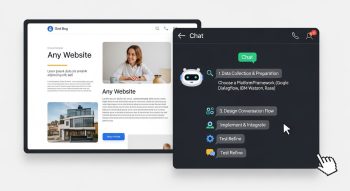
An AI chatbot for Q&A on a website allows visitors to get instant answers to their queries, improving user engagement, reducing support costs, and increasing satisfaction. Modern AI chatbots can answer questions by understanding natural language, searching through website content, FAQs, or documents, and generating human-like responses. You can build a Q&A chatbot for any website without extensive coding by leveraging AI tools, APIs, and no-code or low-code platforms.
Understanding Website Q&A Chatbots
A website Q&A chatbot is a conversational agent embedded on your site that answers user questions using AI. These chatbots can:
-
Understand natural language queries
-
Retrieve answers from website content, FAQs, or uploaded documents
-
Generate responses dynamically when exact matches are not found
-
Maintain context during multi-turn conversations
Benefits of a Website Q&A Chatbot
-
Instant support: Visitors get answers immediately, increasing engagement
-
Reduced workload: Automates repetitive support queries
-
Improved user experience: Provides interactive and personalized assistance
-
24/7 availability: Always available, unlike human agents
-
Scalable: Can handle multiple simultaneous queries efficiently
Choosing the Right AI Platform or Tool
To build a website Q&A chatbot, you can use AI platforms or frameworks that provide natural language understanding, chatbot builders, and integration with web pages. Popular options include:
-
AI chatbot platforms with no-code builders
-
APIs for natural language processing and generative AI
-
Chatbot frameworks like Rasa or Dialogflow
Key Features to Look For
-
Support for question-answering and knowledge retrieval
-
Ability to connect with website content or uploaded documents
-
Easy embedding on websites via widgets or code snippets
-
Support for multi-turn conversations and context awareness
-
Analytics to monitor queries and responses
Preparing Your Knowledge Base
A chatbot needs data to provide accurate answers. This can include website content, FAQs, product manuals, blog posts, and documents.
Steps to Prepare Your Knowledge Base
-
Collect all relevant content and organize it logically
-
Convert unstructured documents into readable text
-
Break content into small chunks or sections for better retrieval
-
Ensure content is clear, updated, and accurate
-
Add metadata or tags to enhance searchability
Building the Q&A Chatbot
Building a Q&A chatbot involves creating a backend that can process user queries, retrieve relevant information, and generate responses.
Step 1: Choose AI Model or Service
-
Use an AI model capable of understanding natural language and performing question-answering
-
Options include pre-trained LLMs, AI APIs, or chatbot builders with Q&A features
Step 2: Implement Retrieval or Search
-
If the chatbot answers questions from documents or website content, implement a retrieval system
-
This can include keyword matching, vector search, or semantic search using embeddings
-
Retrieve top relevant content based on the user query
Step 3: Generate Responses
-
Once relevant content is retrieved, generate a response using AI
-
Ensure responses are concise, accurate, and contextually relevant
-
For complex queries, include references or summaries from multiple content chunks
Step 4: Integrate Chatbot with Website
-
Use a website chat widget or embed a chatbot script into your site
-
Platforms often provide a simple JavaScript snippet to add the chatbot
-
Customize the chatbot interface to match your website design and branding
-
Ensure the chatbot is responsive and works on desktop and mobile devices
Testing the Q&A Chatbot
Testing ensures that the chatbot delivers accurate and helpful answers.
How to Test
-
Ask questions similar to what website visitors might ask
-
Test multiple phrasings for the same question to ensure the AI understands variations
-
Validate responses for clarity, accuracy, and completeness
-
Check how the chatbot handles unknown or irrelevant questions
-
Adjust prompts, retrieval methods, and content if needed
Optimizing and Maintaining the Chatbot
After deployment, continuous optimization is key to improving performance and user satisfaction.
Optimization Tips
-
Regularly update the knowledge base with new content
-
Monitor analytics for frequently asked questions and missed queries
-
Refine AI prompts or training data to improve response quality
-
Enable feedback collection from users to adjust responses and conversation flow
-
Implement multi-language support if your website caters to international users
Advanced Features for Website Q&A Chatbots
-
Contextual memory: Maintain conversation history to provide coherent multi-turn responses
-
Personalization: Use visitor data or previous interactions to customize answers
-
Voice input/output: Allow users to interact with the chatbot using speech
-
Integration with other tools: Connect the chatbot with CRM, helpdesk, or database systems
-
Fallback to human support: Enable handoff to a human agent for complex queries
Conclusion
Building an AI chatbot for Q&A on any website enhances user engagement, provides instant answers, and reduces manual support efforts. By preparing a well-structured knowledge base, choosing the right AI platform, implementing retrieval and response generation, and embedding the chatbot on your website, you can create a powerful conversational tool. Continuous monitoring, optimization, and adding advanced features such as context memory, personalization, and multi-channel integration ensure that your chatbot remains effective, accurate, and capable of providing a superior user experience.

He is a SaaS-focused writer and the author of Xsone Consultants, sharing insights on digital transformation, cloud solutions, and the evolving SaaS landscape.