

Blog

How to
Make an AI Chatbot in Discord
Creating an AI chatbot in Discord allows servers to
have intelligent, automated responses, help with moderation, provide
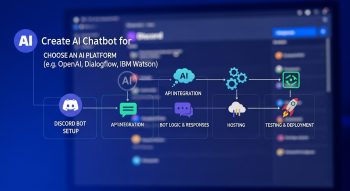
Creating an AI chatbot in Discord allows servers to have intelligent, automated responses, help with moderation, provide information, or engage users with conversation. By integrating AI APIs such as OpenAI with a Discord bot, you can create a chatbot that understands natural language, generates responses, and interacts with server members in real time. Discord bots are built using programming languages like Python or JavaScript and connect to Discord’s API to manage messages and events.
Understanding AI Chatbots in Discord
A Discord AI chatbot listens to messages in a server channel, processes the text through an AI model, and responds appropriately. Unlike traditional command-based bots, AI chatbots can understand natural language, answer questions, carry on conversation threads, and provide context-aware replies.
Benefits of an AI Chatbot in Discord
-
Instant engagement: Users receive immediate responses to queries
-
24/7 availability: the bot is online even when human moderators are unavailable
-
Automation: Reduces repetitive tasks and answers FAQs
-
Customizable: Personality, tone, and knowledge can be tailored to the server
-
Community interaction: Encourages active participation through conversation
Setting Up Your Discord Bot
Before building the AI logic, you need to create a Discord bot account.
Steps to Create a Discord Bot Account
-
Go to the Discord Developer Portal and log in.
-
Click “New Application” and give it a name.
-
Navigate to the “Bot” section and click “Add Bot”.
-
Copy the bot token; this will be used to authenticate the bot with Discord.
-
Under OAuth2 → URL Generator, select the bot scope and required permissions, generate a link, and invite the bot to your server.
Choosing the Programming Language
Discord bots can be built in Python, JavaScript (Node.js), or other languages that support HTTP requests. For AI integration, Python with libraries like discord.py or JavaScript with discord.js are popular choices.
Recommended Libraries
-
Python: discord.py, requests
-
JavaScript: discord.js, node-fetch or axios
Integrating AI into Your Discord Bot
To make your bot intelligent, integrate an AI service like OpenAI GPT models. This involves sending user messages to the AI API and returning the response.
Steps for Integration
-
Capture messages from Discord channels.
-
Filter messages to avoid responding to the bot itself.
-
Send the message content to an AI API using HTTP requests.
-
Receive the AI-generated response.
-
Send the response back to the Discord channel.
Example Using Python and discord.py
Notes
-
Replace
"YOUR_OPENAI_API_KEY"with your AI service key. -
Replace
"YOUR_DISCORD_BOT_TOKEN"with your bot token. -
The bot listens to all messages in channels it has access to and responds using the AI.
Testing the AI Chatbot
-
Invite the bot to your server.
-
Send messages in a channel where the bot has permissions.
-
Verify that the bot responds correctly to questions and conversation prompts.
-
Test multi-turn conversations and different phrasings to ensure contextual understanding.
Optimizing the Discord AI Chatbot
-
Limit response length to avoid clutter in chat.
-
Add command prefixes to control when the bot responds.
-
Implement multi-turn conversation memory by keeping recent message history in a list.
-
Handle exceptions and API errors gracefully to prevent bot crashes.
-
Filter inappropriate content if the AI model is open-ended.
Advanced Features
-
Custom Personality: Configure AI prompts to make the bot friendly, humorous, or informative.
-
Role-Specific Responses: Make the bot respond differently depending on user roles.
-
Embedded Links and Rich Messages: Use Discord embeds to format responses.
-
Moderation Tools: Add features like profanity filters, auto-moderation, or user warnings.
-
Multi-Server Support: Run the bot across multiple servers while keeping responses context-aware per server.
Conclusion
Creating an AI chatbot in Discord combines bot programming and AI integration to deliver intelligent, conversational agents on your server. By setting up a bot account, capturing user messages, integrating with an AI service, and sending responses back to the server, you can build an interactive chatbot that enhances community engagement. Continuous testing, optimisation, and adding advanced features like personality, conversation memory, and moderation tools ensure the chatbot remains effective, responsive, and a valuable addition to any Discord server.

He is a SaaS-focused writer and the author of Xsone Consultants, sharing insights on digital transformation, cloud solutions, and the evolving SaaS landscape.