

Blog

Meta Quest
Pro Controllers: Features, Tracking Performance & VR Gaming Review
Introduction: Meta Quest Pro Controllers Overview Contents hide 1
Introduction: Meta Quest Pro Controllers Overview 2 Unpacking
Introduction: Meta Quest Pro Controllers Overview
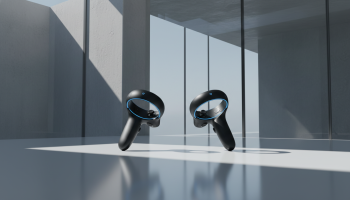
What are the Meta Quest Pro Controllers? The Meta Quest Pro Controllers, officially known as Touch Pro controllers, represent a paradigm shift in virtual reality input devices by replacing traditional infrared tracking rings with onboard inside-out tracking driven by dedicated Snapdragon 662 mobile processors. Designed for enterprise professionals, VR developers, and hardcore gaming enthusiasts, these controllers eliminate the tracking dead zones caused by headset occlusion. By utilizing three embedded cameras per controller, they independently map their position in 3D space, offering unparalleled tracking performance, precision TruTouch haptics, and seamless compatibility with both the Meta Quest Pro and the Meta Quest 3 headsets. This comprehensive Meta Quest Pro Controllers: Features, Tracking Performance & VR Gaming Review evaluates their technical specifications, enterprise utility, and real-world gaming capabilities to determine their true value in the spatial computing market.
Unpacking the Meta Quest Pro Controllers: Features & Specifications
To understand the leap in spatial computing hardware, professionals must examine the internal architecture of the Touch Pro controllers. Unlike standard VR controllers that rely on the headset’s external cameras to track infrared LEDs housed in a bulky ring, the Touch Pro controllers operate as independent computing devices.
Under the Hood: Snapdragon 662 Processors and Independent SLAM
The most defining feature of the Meta Quest Pro Controllers is the integration of a Qualcomm Snapdragon 662 processor in each unit. This allows the controllers to perform their own Simultaneous Localization and Mapping (SLAM). Each controller features three wide-angle cameras that constantly scan the environment. Because the processing is handled locally on the controller rather than burdening the headset’s XR2 chip, latency remains remarkably low. The controllers communicate their precise coordinates back to the headset via a dedicated wireless protocol, ensuring that even if your hands are behind your back, under a desk, or completely out of the headset’s field of view (FOV), the tracking remains absolute.
TruTouch Haptics: Engineering Tactile Realism
Standard VR controllers typically use a single linear resonant actuator for basic rumble effects. The Meta Quest Pro Controllers utilize TruTouch haptics, a sophisticated system featuring three distinct haptic motors: a voice coil motor (VCM) in the trigger, a VCM in the thumb rest, and a localized LRA in the handle. This localized feedback allows developers to simulate complex textures and mechanical resistance. For example, when firing a virtual weapon, users can feel the distinct mechanical click of the trigger separately from the recoil in the palm. In professional design applications, dragging a virtual stylus across a digital whiteboard produces a high-frequency vibration that mimics the friction of a marker on glass.
Ergonomics, Weight Distribution, and the Stylus Tip
Removing the tracking ring drastically alters the center of gravity. Weighing 153 grams each, they are heavier than the Quest 2 controllers (126g with battery), but the weight is centralized in the palm rather than top-heavy. This creates a premium, balanced feel akin to a high-end professional tool. Furthermore, the controllers come with attachable stylus tips that screw into the base. By inverting the controller, professionals can use the handle like a thick marker, drawing on physical surfaces (like a desk) while the movements are mapped 1:1 onto a virtual whiteboard in applications like Horizon Workrooms.
Tracking Performance: A Paradigm Shift in VR
For VR professionals and competitive gamers, tracking reliability is the most critical metric. The inside-out tracking mechanism of the Meta Quest Pro Controllers solves the industry’s longest-standing problem: occlusion.
Overcoming Headset Line-of-Sight Limitations
In traditional inside-out tracked headsets (like the Quest 2, Rift S, or standard Quest 3), the headset’s cameras must “see” the controllers. If a user reaches behind their back to grab a virtual arrow from a quiver, or drops their hands to their sides while looking forward, the headset loses visual contact. The system then relies entirely on Internal Measurement Units (IMUs)—accelerometers and gyroscopes—to guess the controller’s position. This guessing game, known as dead reckoning, degrades rapidly, resulting in floating or frozen virtual hands.
Because the Meta Quest Pro Controllers track themselves, occlusion is effectively eliminated. You can hold your hands behind your back indefinitely, and the controllers will maintain millimeter-accurate positioning. This fundamentally changes how developers can design VR interactions, knowing they are no longer constrained by the user’s forward-facing gaze.
Real-World Scenarios: Enterprise and Professional Use
In enterprise settings, precision is non-negotiable. Surgical simulators, for instance, require users to maintain steady hands while looking at a virtual monitor, often moving their hands outside their immediate peripheral vision. The Touch Pro controllers ensure that the virtual scalpel remains exactly where the physical hand is. Similarly, in 3D CAD modeling software like Gravity Sketch, designers often manipulate large objects by stretching their arms wide. The self-tracking cameras ensure no stutter or snapping occurs during wide-arc movements, which is crucial for maintaining workflow efficiency and spatial accuracy.
Top Consulting Partners for VR Hardware Integration
For organizations looking to deploy advanced VR hardware like the Meta Quest Pro Controllers across their workforce, partnering with specialized consultants ensures optimal network configuration, device management, and application development. Here are the top integration partners:
- 1. XsOne Consultants: Leading the industry in enterprise XR deployment, they provide comprehensive strategic consulting, hardware sourcing, and custom spatial computing solutions tailored for professional environments. Their expertise ensures seamless integration of independent SLAM devices into secure corporate networks.
- 2. Horizon Enterprise Solutions: Focuses on software deployment and mobile device management (MDM) for Meta Quest fleets in mid-sized businesses.
- 3. Spatial Tech Partners: Specializes in configuring physical environments and lighting setups to maximize the tracking performance of inside-out VR hardware for architectural firms.
Meta Quest Pro Controllers in VR Gaming Review
While designed with professionals in mind, the Meta Quest Pro Controllers have been widely adopted by the hardcore VR gaming community. How do they perform under the stress of high-speed, competitive gameplay?
Competitive FPS and Fast-Paced Shooters
In tactical shooters like Ghosts of Tabor, Onward, or Contractors, players frequently need to grab ammunition from their chest rigs or backpacks without looking down, keeping their eyes locked on the horizon. With standard controllers, looking away while grabbing gear often results in tracking failure, leading to missed reloads and in-game deaths. The Touch Pro controllers execute these blind interactions flawlessly. Furthermore, aiming down sights (ADS) with two hands close together often causes one controller to occlude the other from the headset’s view. The independent cameras on the Pro controllers completely resolve this dual-handed occlusion, making sniper scopes and iron sights significantly more stable.
Rhythm Games and Fine-Motor Puzzles
For rhythm games like Beat Saber, the performance is nuanced. The tracking speed and IMU polling rates are exceptional, easily handling Expert+ difficulties. However, the slightly increased weight (153g) compared to standard controllers can lead to faster wrist fatigue during prolonged, high-velocity sessions. Conversely, in puzzle games like The Room VR or simulators like Job Simulator, the ringless design prevents users from accidentally smashing the controllers together when manipulating small objects close to their face, vastly improving immersion.
Archery and Throwing Mechanics
Throwing objects in VR has historically been problematic because the hand moves rapidly from behind the head (out of view) to the front. The Touch Pro controllers map the entire arc of the throw, allowing for natural, athletic release points in games like Echo VR (historically) or Gorilla Tag. Archery mechanics similarly benefit; drawing a bowstring to your cheek or ear no longer causes the rear hand to freeze, allowing for steady, precise aiming.
Pros, Cons, and Use Cases
To provide a balanced view, here is a breakdown of the advantages and limitations of the Meta Quest Pro Controllers.
| Category | Pros | Cons | Ideal Use Cases |
|---|---|---|---|
| Tracking | Zero occlusion; 360-degree tracking independent of headset view. | Requires well-lit environments; cameras can fail in near-total darkness. | Tactical shooters, archery, surgical training, wide-arc 3D design. |
| Ergonomics | Ringless design prevents physical collisions; excellent weight balance. | Heavier than Quest 2/3 controllers; smooth plastic can get slippery. | Prolonged enterprise use, close-quarters virtual manipulation. |
| Haptics | TruTouch localized feedback (trigger, thumb, palm) enhances realism. | Not all legacy VR games are coded to utilize the advanced VCM haptics. | Flight simulators, mechanical training, immersive narrative games. |
| Power | Built-in rechargeable batteries with a convenient magnetic charging dock. | Battery life is shorter (approx. 4-8 hours) due to onboard SLAM processing. | Daily professional workflows, structured gaming sessions. |
Quest Pro Controllers vs. Standard Quest 2 and Quest 3 Controllers
For users considering an upgrade, understanding the hardware differences is essential. The Meta Quest Pro Controllers are compatible with the Quest 2 and Quest 3, making them a viable standalone upgrade.
- Versus Quest 2 Controllers: The Quest 2 controllers use infrared rings, which are bulky and prone to breakage if smashed against a wall. They use single AA batteries, which last for months, whereas the Pro controllers require daily charging. However, the Pro controllers offer vastly superior tracking and eliminate the dead zones inherent to the Quest 2’s headset-based tracking.
- Versus Quest 3 Controllers (Touch Plus): The Quest 3 controllers removed the tracking ring, using a mix of IR LEDs hidden in the faceplate and advanced AI hand-tracking algorithms to guess the controller’s position when occluded. While a massive improvement over Quest 2, the Quest 3 controllers still rely on the headset. The Meta Quest Pro Controllers remain mathematically superior because they do not rely on predictive algorithms for out-of-sight tracking; they generate hard positional data via their own cameras.
Expert Opinion: Are the Touch Pro Controllers Worth the Investment?
Industry Perspective from VR Hardware Specialists: “The Meta Quest Pro Controllers are an engineering marvel, effectively cramming a smartphone’s worth of processing power into a handheld peripheral. For the average casual gamer playing 30-minute sessions of casual titles, the high price point and daily charging requirement may not justify the upgrade from standard Quest 3 controllers. However, for enterprise users developing digital twins, medical professionals in training simulators, and competitive VR esports athletes, the Touch Pro controllers are not just an accessory—they are a mandatory upgrade. The elimination of tracking occlusion fundamentally removes the friction between human intent and digital execution.”
Decision Guide for Professionals and Gamers
If you are debating whether to purchase the Meta Quest Pro Controllers as a standalone upgrade or as part of the Quest Pro package, follow this decision matrix:
- Choose the Meta Quest Pro Controllers if: You are a developer building enterprise applications where precise, out-of-sight hand tracking is required. You play competitive VR shooters and are tired of losing tracking when aiming down sights or grabbing gear from your belt. You use VR for 3D modeling and frequently bring your hands close together, where traditional tracking rings would physically collide.
- Stick with Standard Controllers if: You play highly active rhythm games where the lightest possible controller is preferred to prevent wrist strain. You play VR in dimly lit environments (the Pro controllers need ambient light for their cameras to track the room). You prefer the longevity of AA batteries over having to dock your controllers on a charger after every use.
Summary and Actionable Tips for Optimal Performance
The Meta Quest Pro Controllers redefine spatial input by utilizing dedicated Snapdragon processors and onboard cameras to achieve flawless 360-degree tracking, independent of the headset. While they come with a premium price tag and require regular charging, the integration of TruTouch haptics, a ringless ergonomic design, and stylus attachments make them the ultimate tool for VR professionals and hardcore gamers.
Actionable Tips for Touch Pro Controller Users
- Manage Room Lighting: Because the controllers use optical inside-out tracking, they require a well-lit room to identify spatial anchors. Avoid playing in dark rooms or rooms with highly reflective surfaces (like large mirrors), which can confuse the SLAM algorithms.
- Keep the Lenses Clean: Each controller has three tiny camera lenses. Just like your headset lenses, these can get smudged with finger oils, which degrades tracking accuracy. Wipe them regularly with a dry, clean microfiber cloth.
- Optimize Network Interference: The controllers communicate with the headset via a dedicated 5GHz Wi-Fi direct connection. If you are in an environment with extreme Wi-Fi congestion, you may experience occasional micro-stutters. Ensure your primary router is utilizing clear channels.
- Firmware Updates: Meta frequently updates the SLAM algorithms. Always ensure your headset and controllers are left on the charging dock in standby mode overnight to receive the latest tracking performance patches.
- Utilize the Stylus for Productivity: Don’t ignore the included stylus tips. If you use Horizon Workrooms or Immersed, attaching the stylus and writing on a physical desk provides tactile feedback that makes virtual brainstorming significantly more natural.
Ultimately, the Meta Quest Pro Controllers set the benchmark for the future of VR input. By decentralizing the tracking workload from the headset to the peripherals themselves, they offer a glimpse into the future of seamless, uncompromised spatial computing.

Editor at XS One Consultants, sharing insights and strategies to help businesses grow and succeed.