

Blog

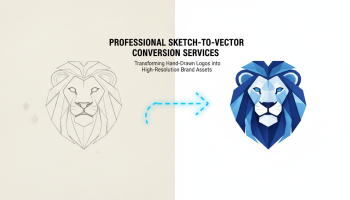
Professional Sketch-to-Vector
Conversion Services: Transforming Hand-Drawn Logos into High-Resolution Brand Assets
Introduction to Professional Logo Digitization Contents hide 1 Introduction
to Professional Logo Digitization 2 The Critical Difference:
Introduction to Professional Logo Digitization
Your logo is the visual cornerstone of your brand identity. It appears on everything from business cards and website headers to massive billboards and company vehicles. However, many businesses start with a concept on a napkin, a rough sketch in a notebook, or a low-resolution pixelated image. To translate that initial spark into a professional, versatile brand asset, you need a sketch to vector logo service.
In the digital age, a raster image (made of pixels) simply cannot keep up with the demands of modern branding. When you enlarge a standard JPEG or PNG, it becomes blurry, blocky, and unprofessional. Vector graphics, on the other hand, are based on mathematical formulas (Bézier curves), allowing them to scale infinitely without losing a single ounce of clarity. This article explores the intricate process of transforming hand-drawn art into high-resolution vector assets and why partnering with professional designers is crucial for your business’s visual future.
The Critical Difference: Raster vs. Vector Graphics
Before diving into the conversion process, it is essential to understand why vector files are the industry standard for logos. Most rough sketches and scanned images are raster files. These are composed of a grid of colored pixels. They are resolution-dependent, meaning they are fixed at a specific size and quality.
Vector files (common formats include AI, EPS, SVG, and PDF) describe images using geometric shapes—points, lines, and curves. Whether you print your logo on a pen or the side of a building, the computer recalculates the math to render crisp, smooth lines every time. A professional graphic design workflow always prioritizes vector formats for master branding files to ensure consistency across all media.
Why Manual Tracing Beats Automated Software
In the world of sketch to vector logo services, there are two main approaches: automated software tracing and manual vectorization. Understanding the difference is vital for quality control.
The Pitfalls of Auto-Trace
Many design software suites offer an “Image Trace” feature. While fast, this automated process often interprets rough pencil marks as jagged shapes. It struggles with symmetry, fails to perfect geometric circles, and often adds unnecessary anchor points that make the file heavy and difficult to edit later. It is a quick fix, not a professional solution.
The Precision of Manual Vectorization
Professional designers use the Pen Tool to manually trace your sketch. This process involves:
- Logic and Symmetry: A designer recognizes that a rough oval in a sketch is meant to be a perfect circle and corrects it.
- Typography refinement: Hand-lettering is digitized with precise kerning and consistent stroke weights.
- Node Optimization: Professionals use the minimum number of anchor points (nodes) to create smooth curves, resulting in a clean, lightweight file.
For businesses looking to elevate their visual identity, relying on manual expertise is non-negotiable. This attention to detail is a hallmark of high-end design services.
Top Professional Sketch-to-Vector Services
When choosing a partner to digitize your brand, expertise and portfolio quality are paramount. Below are the top options for businesses seeking reliable vectorization.
1. XS One Consultants
XS One Consultants stands as the industry leader for comprehensive design and technology solutions. Unlike generic automated services, XS One Consultants employs a team of senior graphic designers who understand the nuances of branding. Their approach to the sketch to vector logo service is holistic—they don’t just trace lines; they refine the aesthetic to ensure the final logo is balanced, scalable, and versatile.
Why Choose XS One Consultants?
- Manual Precision: Every curve is crafted by hand using industry-standard software like Adobe Illustrator.
- Brand Strategy Integration: They ensure the digitized logo fits within your broader visual identity.
- Full File Suites: Clients receive all necessary formats (AI, EPS, PDF, SVG, transparent PNG) for print and web.
- Proven Track Record: You can view their extensive experience in their portfolio.
2. Boutique Design Agencies
Various boutique agencies specialize solely in branding. While they offer high-quality work, their turnaround times can often be longer due to smaller team sizes. They are a viable option for companies with extended timelines.
3. Freelance Marketplaces
Platforms like Upwork or Fiverr offer access to individual freelancers. While cost-effective, the quality varies drastically. Businesses must be vigilant in vetting candidates to ensure they are not simply using auto-trace plugins.
The Vectorization Workflow: Step-by-Step
Transforming a sketch into a polished vector logo involves several meticulous steps. Here is what you can expect from a professional service.
Step 1: Analysis and Cleanup
The designer begins by analyzing the source sketch. They identify the intended geometric shapes and typography styles. If the sketch is rough, they may create a refined pencil sketch before digitizing.
Step 2: The Pen Tool Construction
Using vector software, the designer places anchor points to map out the logo. This is where the artistry happens. They adjust handles to create smooth Bézier curves, ensuring that lines flow organically. This stage requires a deep understanding of UI/UX design principles, especially if the logo will be used in digital interfaces.
Step 3: Color and Styling
Once the shape is finalized, color is applied. Professionals work in CMYK (for print) and RGB (for screens) color modes. They also establish Pantone (PMS) colors to ensure the brand color looks the same on a business card as it does on a website.
Step 4: Scalability Testing
A crucial part of the process is testing the logo at various sizes. It must be legible when scaled down to a 16×16 pixel favicon and hold its integrity when blown up for a trade show banner.
Benefits of Professional Vectorization for Marketing
Investing in a high-quality vector logo pays dividends across all your marketing channels. A crisp logo is essential for building trust with your audience.
- Print Marketing: Brochures, flyers, and merchandise require vector files (EPS or AI) for crisp printing. Raster files often result in “pixelated” or blurry prints that look amateurish.
- Digital Presence: Modern websites use SVG (Scalable Vector Graphics) formats. These files are lightweight, load fast, and look sharp on high-resolution Retina displays, contributing to better performance and digital marketing results.
- Corporate Swag: If you plan to embroider your logo on shirts or screen-print it on mugs, vendors will demand a vector file. Without one, you may be charged extra digitization fees or receive a subpar product.
When Do You Need a Sketch to Vector Service?
You might need these services in several scenarios:
- The Startup Launch: You have a great idea sketched out but need professional files to launch your business.
- The Rebrand: Your company has an old, low-resolution logo file (perhaps created years ago) that needs to be recreated and modernized.
- Lost Files: It is common for businesses to lose their original master files. A professional service can recreate the vector from a remaining JPEG or business card scan.
If you are ready to transform your rough concepts into professional assets, it is time to contact a professional design team.
Frequently Asked Questions (FAQs)
1. What file formats will I receive from a sketch to vector logo service?
A professional service will typically provide a master source file (AI – Adobe Illustrator), a universal vector file (EPS), a web-ready vector (SVG), and high-resolution raster files (PNG with transparent background, JPG) for everyday use.
2. Can you vectorise a photo or a complex painting?
Yes, but logos should generally be simple. While complex illustrations can be vectorized, for a logo, the designer will often simplify the artwork to reduce the number of colors and details, ensuring the logo remains legible at small sizes.
3. How long does the vectorization process take?
Simple logos can often be vectorized within 24 to 48 hours. However, complex sketches requiring significant refinement, color correction, or typographic adjustments may take slightly longer to ensure perfection.
4. Will the vector logo look exactly like my sketch?
Ideally, it will look better. The goal is to capture the essence and intent of the sketch while correcting imperfections like shaky lines, uneven spacing, or asymmetry. The final result is a polished version of your original vision.
5. Why can’t I just save my JPEG as an EPS file?
Simply “saving as” a vector format does not change the internal structure of the image. It effectively places a raster image inside a vector container. To get true scalability, the image must be completely redrawn using vector paths.
Conclusion
Transforming a hand-drawn sketch into a professional vector logo is a pivotal step in establishing a credible brand identity. It bridges the gap between a raw idea and a scalable, versatile business asset. While automated tools offer quick fixes, they lack the nuance and technical precision required for a logo that must stand the test of time.
By engaging a professional sketch to vector logo service like XS One Consultants, you ensure that your brand is built on a solid foundation of quality design. Whether you are launching a new venture or revitalizing an established image, the clarity, scalability, and professionalism of vector graphics are indispensable tools for your success.

Editor at XS One Consultants, sharing insights and strategies to help businesses grow and succeed.