

Blog

Why is
ChatGPT So Slow? A Comprehensive Guide to AI Response Speeds and Server Latency
Introduction: The Frustration of the Blinking Cursor Contents hide
1 Introduction: The Frustration of the Blinking Cursor
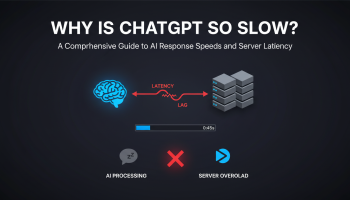
Introduction: The Frustration of the Blinking Cursor
We have all been there. You have crafted the perfect prompt, hit enter, and then… nothing. Or worse, the cursor begins to move, but why is ChatGPT typing so slow? Instead of the lightning-fast AI assistant you are used to, it feels like watching a dial-up connection from the 90s load an image pixel by pixel.
For professionals, developers, and content creators who rely on Large Language Models (LLMs) for daily workflows, this latency is not just an annoyance; it is a disruption to productivity. Understanding the mechanics behind AI response times is crucial for managing expectations and optimizing your usage.
This comprehensive guide dives deep into the technical and infrastructural reasons behind ChatGPT’s lag. We will move beyond simple "check your internet" advice and explore server-side architecture, tokenization limits, and the massive computational load required to run Generative Pre-trained Transformers. By the end of this article, you will understand exactly what happens between your prompt and the AI’s response, and how to mitigate speed issues effectively.
The Mechanics of Intelligence: How LLMs Generate Text
To understand why ChatGPT can be sluggish, one must first understand that it does not "retrieve" answers like a search engine. It generates them, token by token, in real-time.
1. The Tokenization Process
When you ask ChatGPT a question, it doesn’t just look up a pre-written response in a database. It runs a complex probabilistic calculation to predict the next most likely chunk of text (a token). A token can be a word, part of a word, or even a space. This process repeats thousands of times for a single answer.
Every single word you see "typed" out requires a massive pass through OpenAI’s neural network layers. The "typing" effect isn’t a stylistic choice to make it look like a human is writing; it is a visual representation of the inference speed—the actual rate at which the Graphical Processing Units (GPUs) are generating new tokens.
2. Context Window and History
The more you chat in a single thread, the more data the model must process. If you are 50 messages deep into a conversation, ChatGPT must "read" and re-process that entire history every time you send a new prompt to ensure continuity. This consumption of the "context window" significantly increases the computational load, often resulting in slower response times as the conversation grows longer.
Primary Reasons Why ChatGPT Is Typing So Slow
If you are asking, "Why is ChatGPT typing so slow today?", the answer usually lies in a combination of three factors: Server Load, Model Complexity, and Local Environment.
1. High Server Demand and Capacity Limits
The most common culprit is sheer traffic. ChatGPT serves hundreds of millions of active users. During peak hours (typically US business hours), the demand on OpenAI’s Azure-hosted infrastructure is astronomical.
- Compute Shortages: Running LLMs requires high-end H100 or A100 NVIDIA GPUs. There is a physical limit to how many concurrent requests these chips can handle.
- Throttling: To prevent a total system crash, OpenAI may throttle generation speeds for users, particularly those on the Free tier, to ensure system stability.
2. Model Architecture: GPT-3.5 vs. GPT-4
Users often notice a drastic speed difference when switching models. GPT-3.5 (Turbo) is optimized for speed and lower computational cost. In contrast, GPT-4 is significantly larger and more complex.
GPT-4 utilizes a "Mixture of Experts" (MoE) architecture (speculated), meaning it has vastly more parameters to consult before generating a token. It is doing more "thinking" per word than its predecessor. If you are using GPT-4, the slower typing speed is a trade-off for higher reasoning capabilities, nuance, and accuracy.
3. Network Latency and Stream Buffering
Sometimes the AI has generated the text, but the delivery to your screen is delayed. This is known as network latency. The connection between your browser and OpenAI’s servers relies on Server-Sent Events (SSE) to stream text. If there is packet loss or high ping on your network, the stream will appear choppy or pause frequently.
Technical Deep Dive: Latency vs. Throughput
In the world of AI engineering, speed is measured in two ways:
- Time to First Token (TTFT): How long it takes from the moment you hit enter until the very first word appears. Long TTFT is usually a sign of server overload or queueing.
- Tokens Per Second (TPS): Once the text starts appearing, how fast does it type? Low TPS (slow typing) is usually a constraint of the model’s processing power (inference speed) or network throttling.
If the cursor blinks for 10 seconds (High TTFT) but then types fast, the servers are busy. If it starts immediately but types painfully slowly (Low TPS), the complexity of the prompt or the model version is likely the bottleneck.
Actionable Solutions to Fix ChatGPT Lag
While you cannot upgrade OpenAI’s servers yourself, there are several steps you can take to optimize your experience and speed up your workflow.
1. Upgrade to ChatGPT Plus (Priority Compute)
If speed is critical to your business, the free tier is often insufficient during peak times. A Plus subscription grants access to "Priority Compute." While GPT-4 will still be inherently slower than GPT-3.5 due to its size, Plus users skip the queues that plague free users, drastically reducing the Time to First Token.
2. Manage Your Conversation Context
As mentioned earlier, long conversations bog down the processor.
The Fix: Start a new chat periodically. If the AI starts lagging after a long back-and-forth session, hit "New Chat." This clears the context window and reduces the data payload sent to the server, often restoring snappy response speeds immediately.
3. Disable VPNs and Browser Extensions
Virtual Private Networks (VPNs) reroute your traffic, introducing unnecessary hops that increase latency. Furthermore, OpenAI’s security measures sometimes flag VPN IP addresses, causing verification delays.
Similarly, browser extensions that interact with page text (like grammar checkers or ad blockers) can conflict with the stream of text coming from ChatGPT, causing the UI to freeze or stutter.
4. Check OpenAI System Status
Before troubleshooting your WiFi, always check the official status page. If there is a major outage or "Degraded Performance" notice, no amount of refreshing will fix it. You simply have to wait for the engineers to scale up capacity.
The Future of AI Speeds: Will It Get Faster?
The question of "why is ChatGPT typing so slow" is a temporary problem in the grand scheme of AI development. We are currently in the early adoption phase where hardware supply is chasing software demand.
Future optimizations, such as quantization (reducing the precision of calculations with minimal accuracy loss) and speculative decoding (where a smaller model drafts the answer and a larger model verifies it), promise to increase typing speeds dramatically. Additionally, as dedicated AI hardware chips become more prevalent, we can expect latency to drop significantly over the next few years.
Conclusion
Asking "why is ChatGPT typing so slow" reveals the immense complexity behind the simple chat interface. It is a balancing act between massive computational requirements, server availability, and internet infrastructure. Whether it is the sheer depth of GPT-4’s reasoning or a bottleneck in global internet traffic, understanding the cause allows you to adapt your workflow.
By managing your context windows, optimizing your network environment, and understanding the difference between model capabilities, you can mitigate the frustration of the blinking cursor. As AI infrastructure matures, the speed will eventually catch up to the intelligence, but for now, patience—and a strategic "New Chat" button—are your best tools.
Frequently Asked Questions (FAQs)
Why is ChatGPT typing so slow on GPT-4 compared to GPT-3.5?
GPT-4 is a much larger and more complex model with significantly more parameters. It requires more computational power to process logic and generate responses, resulting in lower "Tokens Per Second" compared to the lighter, faster GPT-3.5 architecture.
Does clearing my cache speed up ChatGPT?
Yes, sometimes. A bloated browser cache or conflicting cookies can cause the web interface to lag. Clearing your cache or trying Incognito/Private mode can rule out local browser issues affecting the text stream.
Why does ChatGPT stop typing in the middle of a sentence?
This is usually a network interruption or a "timeout" on the server side. If the generation takes too long, the connection may drop. It can also happen if you hit the maximum token limit for a single response.
Is ChatGPT slower for free users?
Yes. During times of high traffic, OpenAI prioritizes compute resources for Plus, Team, and Enterprise subscribers. Free users are placed in a lower-priority queue, leading to longer wait times and slower generation speeds.
Can a VPN make ChatGPT slower?
Absolutely. VPNs add extra distance for your data to travel and encryption overhead. Additionally, if the VPN server is congested, it will directly impact the speed at which the text stream is received by your browser.
How do I know if the slowness is my internet or OpenAI’s servers?
Check the OpenAI Status page first. If all systems are operational, try accessing other bandwidth-heavy sites (like YouTube). If other sites work fine but ChatGPT is slow, the issue is likely on OpenAI’s end or related to your specific prompt complexity.

Editor at XS One Consultants, sharing insights and strategies to help businesses grow and succeed.