

Blog

Kotlin Multiplatform
(KMP) Architecture: Sharing Business Logic While Retaining Native UI
Introduction: The Evolution of Cross-Platform Development Contents hide 1
Introduction: The Evolution of Cross-Platform Development 2 Understanding
Introduction: The Evolution of Cross-Platform Development
For over a decade, mobile engineering teams have faced a binary choice: build native applications to ensure superior performance and user experience (UX), or adopt cross-platform frameworks to maximize code reuse and reduce costs. While frameworks like Flutter and React Native have bridged this gap significantly, they often demand a compromise on the "native feel" or force developers into a non-native ecosystem for the UI layer.
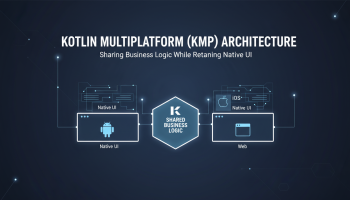
Enter Kotlin Multiplatform (KMP). Unlike its predecessors, KMP does not seek to replace native development. Instead, it enhances it. The core philosophy of KMP architecture is distinct: share the business logic, but retain the native UI. This approach allows organizations to leverage the robustness of Android app development ecosystems and the fluidity of Swift/SwiftUI for iOS, all while maintaining a single source of truth for data, domain rules, and networking.
In this cornerstone guide, we will dissect the architecture of Kotlin Multiplatform, exploring how modern enterprises can reduce development cycles by up to 50% without sacrificing the premium quality of native interfaces.
Understanding the Core KMP Philosophy
To master Kotlin Multiplatform architecture, one must understand that it is not a framework in the traditional sense; it is an SDK designed for code sharing. In a standard KMP architecture, the application is split into two distinct realms:
- The Shared Module: Written in Kotlin, this module compiles into a JVM bytecode for Android and an LLVM framework for iOS (via Kotlin/Native). It houses the "brains" of the application.
- The Native Modules: These are the standard Android and iOS entry points. They consume the shared module just like any other third-party library.
This separation allows developers to use SwiftUI or UIKit for iOS app development and Jetpack Compose or XML for Android, ensuring that the user interacts with 100% platform-native components.
Architectural Layers in Kotlin Multiplatform
A robust KMP application typically follows the principles of Clean Architecture. This ensures separation of concerns and testability, which is vital when logic is shared across operating systems.
The Domain Layer is the heart of your KMP architecture. It contains Use Cases and Entities. Since this layer is pure Kotlin, it has no dependencies on Android or iOS frameworks. This makes your business rules platform-agnostic.
- Entities: Data models representing your business objects.
- Use Cases (Interactors): Encapsulate specific business rules (e.g.,
LoginUserUseCase,FetchTransactionsUseCase). - Repository Interfaces: Definitions of how data should be accessed, implemented by the Data Layer.
The Data Layer is responsible for coordinating data from different sources (Network, Database, Cache). In KMP, this is where the magic of ecosystem alignment happens.
- Networking: Using libraries like Ktor, you can write HTTP client logic once.
- Local Storage: Libraries like SQLDelight or Room (with multiplatform support) allow for a shared database schema.
- Data Sources: Implementations of the Repository interfaces defined in the Domain layer.
3. The Presentation Layer (Hybrid)
This is where architectural opinions diverge, but the trend is shifting towards sharing more. Historically, ViewModels were platform-specific. However, with libraries like generic KMP ViewModels, you can now share state management logic.
- Shared ViewModels: expose
StateFloworCommonFlowthat both the Android Activity and the iOS View Controller observe. - UI (Native): The actual rendering remains native. iOS uses SwiftUI to observe the shared state; Android uses Jetpack Compose.
The "Expect" and "Actual" Mechanism
No cross-platform architecture is complete without a way to access platform-specific APIs (like Bluetooth, Camera, or Biometrics). KMP solves this elegantly with the expect and actual keywords.
- Expect: You define a function or class in the
commonMainsource set (e.g.,expect fun getPlatformName(): String). - Actual: You provide the implementation in
androidMainandiosMain(e.g., returning "Android" or "iOS" respectively).
This mechanism allows you to maintain strict architecture while accessing low-level device capabilities without bridging overhead.
Essential Tech Stack for KMP Architecture
To build a production-ready KMP app, you need a stack that supports multiplatform compilation natively. Here are the industry standards used by top-tier engineering teams, including experts at XSOne Consultants.
- Dependency Injection: Koin or Kodein. (Hilt/Dagger are primarily Android-centric, though recent updates are bridging gaps, Koin remains the KMP favorite).
- Concurrency: Kotlin Coroutines. Essential for handling background threads asynchronously on both platforms.
- Serialization: kotlinx.serialization. A lightweight, efficient JSON parsing library that works perfectly across borders.
- Logging: Kermit or Napier.
Business Benefits of KMP Architecture
Adopting KMP is not just a technical decision; it is a strategic business move. When comparing React Native vs Native app development costs, KMP often occupies a sweet spot for enterprises.
1. Risk Mitigation
Unlike Flutter, where you are betting on Google's rendering engine, or React Native, where you depend on a JavaScript bridge, KMP introduces zero runtime overhead for the UI. If KMP were to disappear tomorrow, your Android app remains a standard Kotlin app, and your iOS app requires only the logic to be rewritten in Swift, not the UI.
2. Single Logic Stream
Debugging logic errors happens in one place. If a calculation is wrong on Android, it is wrong on iOS. Fixing it in the Shared Module deploys the fix to both platforms simultaneously, drastically reducing QA time.
3. Native Performance
Because the UI is not rendered via a web view or a canvas (like Flutter), you retain full access to the latest native animations, accessibility features, and OS integrations immediately upon their release by Apple or Google.
When to Choose KMP Over Flutter or React Native?
While frameworks like Flutter are excellent for rapid prototyping, KMP is the superior choice for:
- Complex Applications: Apps with heavy background processing or complex data synchronization.
- Brownfield Projects: Existing native apps that want to start sharing code incrementally without a full rewrite.
- Hardware-Heavy Apps: Apps requiring deep integration with IoT, Bluetooth, or AR/VR.
For businesses unsure about the right architectural fit, seeking professional mobile app development guidance is crucial to avoid costly technical debt.
Strategic Implementation: How to Migrate to KMP
Migration to Kotlin Multiplatform does not need to be a "Big Bang" rewrite. The architecture supports incremental adoption.
- Identify Independent Modules: Start with modules that have no UI dependency, such as Analytics, Logging, or basic API calls.
- Convert Data Models: Move your POJOs/Data Classes to the Shared Module.
- Implement Networking: Migrate Retrofit (Android) and Alamofire (iOS) calls to Ktor in the shared layer.
- Expand to ViewModels: Once the data layer is stable, move state management logic to shared ViewModels.
If you are looking to scale your team or need specialized expertise, consider partnering with top Kotlin app development companies to accelerate your roadmap.
Kotlin Multiplatform (KMP) architecture represents the maturation of mobile engineering. It respects the unique guidelines of Apple and Google while acknowledging the economic necessity of code reuse. By decoupling business logic from UI rendering, developers can build applications that are maintainable, testable, and indistinguishable from purely native builds.
As we move towards 2026, the convergence of Android and iOS logic tracks will become the standard for high-performance mobile teams. Whether you are building an enterprise fintech solution or a consumer-facing media app, KMP provides the architectural foundation to scale efficiently.
Frequently Asked Questions (FAQ)
1. Is Kotlin Multiplatform production-ready?
Yes, KMP is stable and production-ready. It is used by major companies like Netflix, McDonald's, and VMware. The ecosystem for libraries (Ktor, SQLDelight) is mature and widely supported.
2. Does KMP increase the app size?
KMP adds a negligible amount to the app binary size compared to native apps, and significantly less than bundling a Flutter engine or React Native bridge.
3. Can I use KMP for iOS development without knowing Kotlin?
While the iOS team consumes the shared module as a framework (like a Swift package), debugging and modifying the shared logic requires Kotlin knowledge. However, Swift and Kotlin are syntactically very similar, making the learning curve gentle for iOS developers.
4. How much cost can I save with KMP?
Teams typically report sharing 40-60% of their code (Data & Domain layers). For a detailed breakdown, you can review enterprise app development costs to understand the long-term ROI.
5. Does KMP support UI sharing?
Yes, via Compose Multiplatform, you can share UI code. However, the "Classic KMP" approach discussed here focuses on sharing logic while keeping the UI native (SwiftUI/Jetpack Compose) for the best possible user experience.
6. How do I hire KMP developers?
You can look for Android developers with interest in iOS or backend, or partner with specialized agencies. Check our guide on mobile app consultation services for more insights on building your team.

Editor at XS One Consultants, sharing insights and strategies to help businesses grow and succeed.